Innodb存储引擎是第一个完整支持ACID事务的MySQL存储引擎,特点是行锁设计、支持MVCC、支持外键、提供一致性非锁定读。

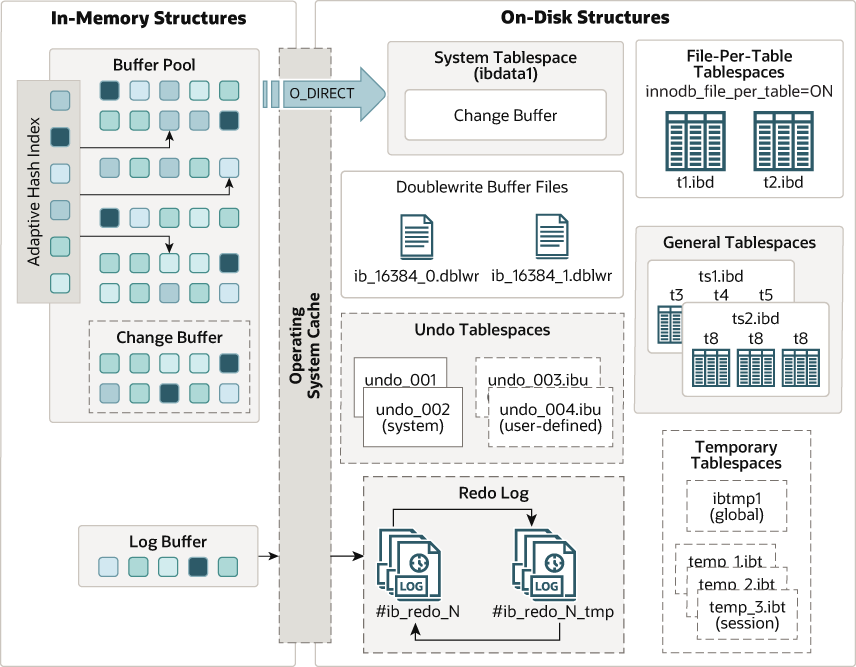
InnoDB Architecture

https://dev.mysql.com/doc/refman/9.4/en/images/innodb-architecture-8-0.png

InnoDB存储结构

表空间 Tablespaces

InnoDB存储引擎的逻辑存储结构是将所有的数据都被逻辑地放在了一个空间中。如果用户启用了参数 innodb_file_per_table(在8.0版本中默认开启) ,则每张表都会有一个表空间(xxx.ibd),一个mysql实例可以对应多个表空间,用于存储记录、索引等数据。

表空间分为系统表空间(System Tablespaces)(共享表空间ibdata1)临时表空间(Temporary Tablespaces)、常规表空间(General Tablespaces)、Undo表空间(Undo Tablespaces)和独立表空间(File-Per_Table Tablespaces)(独立表空间)

系统表空间 System Tablespace

系统表空间可以对应文件系统上一个或多个实际的文件,默认情况下, InnoDB会在数据目录下创建一个名为.ibdata1,大小为 12M的文件。该文件是可以自扩展的,当不够用的时候它会自己增加文件大小。

1
2
3
4
SHOW VARIABLES LIKE '%innodb_data_file_path%';

# Variable_name Value
1 innodb_data_file_path ibdata1:12M:autoextend
1
SHOW VARIABLES LIKE '%innodb_file_per_table%';

段(Segment)分为索引段数据段回滚段等。InnoDB是索引组织表,索引段就是非叶子结点部分,而数据段就是叶子结点部分,回滚段用于数据的回滚和多版本控制。一个段包含256个区(256M大小)。

区是页的集合,一个区包含64个连续的页,默认大小为 1MB (64*16K)。

页是InnoDB管理存储空间的基本单位,也是内存和磁盘交互的基本单位。

1
SHOW VARIABLES LIKE 'innodb_page_size'

InnoDB内存结构

HashMap

成员变量

1
2
3
4
5
6
7
8
9
10
11
12
13
14
15
16
17
18
19
20
21
22
23
24
25
26
27
28
29
30
31
32
33
34
35
// 默认大小
static final int DEFAULT_INITIAL_CAPACITY = 1 << 4; // aka 16

// 最大容量
static final int MAXIMUM_CAPACITY = 1 << 30;

// 加载因子(可通过构造函数设置)
static final float DEFAULT_LOAD_FACTOR = 0.75f;

// 树化的链表长度阈值(当链表数量大于该值变为红黑树)
static final int TREEIFY_THRESHOLD = 8;

// 链表化的树的节点数量阈值(当红黑树节点数量小于该值退为链表)
static final int UNTREEIFY_THRESHOLD = 6;

// 树化的桶的最低数量(只有Node桶的数量大于该值才会树化,否则优先扩容)
static final int MIN_TREEIFY_CAPACITY = 64;

// 桶数组(指向的是该桶的第一个元素,链表或红黑树)
transient Node<K,V>[] table;

// entrySet()的结果缓存
transient Set<Map.Entry<K,V>> entrySet;

// 实际元素数量
transient int size;

// 修改次数 用于fail-fast
transient int modCount;

// (capacity * load factor)
int threshold;

// 负载因子
final float loadFactor;

成员子结构

1
2
3
4
5
6
7
8
9
10
11
12
13
14
15
16
17
18
19
20
21
22
23
24
25
26
27
28
29
30
31
32
33
34
35
36
37
38
39
40
41
42
43
44
45
46
47
48
49
50
// 基本链表元素(也是桶数组Table的类型)
static class Node<K,V> implements Map.Entry<K,V> {
final int hash;
final K key;
V value;
Node<K,V> next;

Node(int hash, K key, V value, Node<K,V> next) {
this.hash = hash;
this.key = key;
this.value = value;
this.next = next;
}

public final K getKey() { return key; }
public final V getValue() { return value; }
public final String toString() { return key + "=" + value; }

public final int hashCode() {
return Objects.hashCode(key) ^ Objects.hashCode(value);
}

public final V setValue(V newValue) {
V oldValue = value;
value = newValue;
return oldValue;
}

public final boolean equals(Object o) {
if (o == this)
return true;

return o instanceof Map.Entry<?, ?> e
&& Objects.equals(key, e.getKey())
&& Objects.equals(value, e.getValue());
}
}

// 基本红黑树节点元素
static final class TreeNode<K,V> extends LinkedHashMap.Entry<K,V> {
TreeNode<K,V> parent; // red-black tree links
TreeNode<K,V> left;
TreeNode<K,V> right;
TreeNode<K,V> prev; // needed to unlink next upon deletion
boolean red;
TreeNode(int hash, K key, V val, Node<K,V> next) {
super(hash, key, val, next);
}
// .......
}

其中TreeNode继承LinkedHashMap.Entry继承Node,所以TreeNode继承Node,而table数组是Node类型。所以桶数组(Table)即可以是Node,也可以是TreeNode。

构造函数

1
2
3
4
5
6
7
8
9
10
11
12
13
14
15
16
17
18
19
20
21
22
23
24
25
26
27
28
29
// 创建一个空的HashMap,初始化容量和负载因子
public HashMap(int initialCapacity, float loadFactor) {
if (initialCapacity < 0)
throw new IllegalArgumentException("Illegal initial capacity: " +
initialCapacity);
if (initialCapacity > MAXIMUM_CAPACITY)
initialCapacity = MAXIMUM_CAPACITY;
if (loadFactor <= 0 || Float.isNaN(loadFactor))
throw new IllegalArgumentException("Illegal load factor: " +
loadFactor);
this.loadFactor = loadFactor;
this.threshold = tableSizeFor(initialCapacity);
}

// 创建一个空的HashMap,初始化容量以及默认的负载因子0.75
public HashMap(int initialCapacity) {
this(initialCapacity, DEFAULT_LOAD_FACTOR);
}

// 创建一个空的HashMap,默认容量16,默认负载因子0.75
public HashMap() {
this.loadFactor = DEFAULT_LOAD_FACTOR; // all other fields defaulted
}

// 接受Map参数,将Map元素添加到新的HashMap中
public HashMap(Map<? extends K, ? extends V> m) {
this.loadFactor = DEFAULT_LOAD_FACTOR;
putMapEntries(m, false);
}

HashMap中的table数组只有在第一次插入元素时才会创建table数组。

put方法

1
2
3
4
5
6
7
8
9
10
11
12
13
14
15
16
17
18
19
20
21
22
23
24
25
26
27
28
29
30
31
32
33
34
35
36
37
38
39
40
41
42
43
44
45
46
47
48
49
50
51
52
53
54
55
56
57
58
59
60
61
62
public V put(K key, V value) {
return putVal(hash(key), key, value, false, true);
}

// 添加元素
final V putVal(int hash, K key, V value, boolean onlyIfAbsent,
boolean evict) {
Node<K,V>[] tab; Node<K,V> p; int n, i;
// 如果table未初始化或长度为0,则调用resize()初始化table并确定容量
if ((tab = table) == null || (n = tab.length) == 0)
n = (tab = resize()).length;
// 如果该位置没有冲突(桶为空),直接新建一个节点放入table[i]
if ((p = tab[i = (n - 1) & hash]) == null)
tab[i] = newNode(hash, key, value, null);
// 如果该位置已有节点(即发生哈希冲突),处理冲突
else {
Node<K,V> e; K k;
// 如果第一个节点的hash和key都相等,e = p,用于后续直接覆盖 value
if (p.hash == hash &&
((k = p.key) == key || (key != null && key.equals(k))))
e = p;
// 如果是红黑树节点,调用putTreeVal插入红黑树
// 如果插入成功返回null,如果有相同hash和key的元素返回已存在的节点e
else if (p instanceof TreeNode)
e = ((TreeNode<K,V>)p).putTreeVal(this, tab, hash, key, value);
// 如果p是链表节点,向链表尾部添加新元素或返回hash和key相同的元素e
else {
for (int binCount = 0; ; ++binCount) {
// 到达链表尾部
if ((e = p.next) == null) {
// 将新的节点插入到链表尾部
p.next = newNode(hash, key, value, null);
// 如果链表长度达到阈值(默认8),尝试将链表转为红黑树
if (binCount >= TREEIFY_THRESHOLD - 1) // -1 for 1st
treeifyBin(tab, hash);
break;
}
// 如果找到hash和key都相同的元素直接返回e
if (e.hash == hash &&
((k = e.key) == key || (key != null && key.equals(k))))
break;
p = e;
}
}
// 在桶中找到了key值、hash值与插入元素相等的结点
// 替换为新value值并返回旧值
if (e != null) {
V oldValue = e.value;
if (!onlyIfAbsent || oldValue == null)
e.value = value;
afterNodeAccess(e);
return oldValue;
}
}
// 修改次数增加
++modCount;
// size + 1 如果超出容量需要扩容
if (++size > threshold)
resize();
afterNodeInsertion(evict);
return null;
}

get方法

1
2
3
4
5
6
7
8
9
10
11
12
13
14
15
16
17
18
19
20
21
22
23
24
25
26
27
28
29
public V get(Object key) {
Node<K,V> e;
return (e = getNode(key)) == null ? null : e.value;
}


final Node<K,V> getNode(Object key) {
Node<K,V>[] tab; Node<K,V> first, e; int n, hash; K k;
if ((tab = table) != null && (n = tab.length) > 0 &&
(first = tab[(n - 1) & (hash = hash(key))]) != null) {
// 根据hash值 判断tab[(n - 1) & (hash = hash(key))]中第一个元素是否相同
if (first.hash == hash && // always check first node
((k = first.key) == key || (key != null && key.equals(k))))
return first;
// 从第二个元素开始判断
if ((e = first.next) != null) {
// 红黑树中寻找key
if (first instanceof TreeNode)
return ((TreeNode<K,V>)first).getTreeNode(hash, key);
// 链表中寻找key
do {
if (e.hash == hash &&
((k = e.key) == key || (key != null && key.equals(k))))
return e;
} while ((e = e.next) != null);
}
}
return null;
}

扩容方法 resize()

1
2
3
4
5
6
7
8
9
10
11
12
13
14
15
16
17
18
19
20
21
22
23
24
25
26
27
28
29
30
31
32
33
34
35
36
37
38
39
40
41
42
43
44
45
46
47
48
49
50
51
52
53
54
55
56
57
58
59
60
61
62
63
64
65
66
67
68
69
70
71
72
73
74
75
76
77
78
final Node<K,V>[] resize() {
Node<K,V>[] oldTab = table;
int oldCap = (oldTab == null) ? 0 : oldTab.length;
int oldThr = threshold;
int newCap, newThr = 0;
if (oldCap > 0) {
if (oldCap >= MAXIMUM_CAPACITY) {
threshold = Integer.MAX_VALUE;
return oldTab;
}
// 若满足条件,将容量翻倍 int newCap, newThr = 0;
if (oldCap > 0) {
else if ((newCap = oldCap << 1) < MAXIMUM_CAPACITY &&
oldCap >= DEFAULT_INITIAL_CAPACITY)
newThr = oldThr << 1; // double threshold
}
// 若创建时指定了初始容量或负载因子,会存在threshold并将其赋值给newCap
else if (oldThr > 0)
newCap = oldThr;
// 若创建时没有参数,则使用默认值
else {
newCap = DEFAULT_INITIAL_CAPACITY;
newThr = (int)(DEFAULT_LOAD_FACTOR * DEFAULT_INITIAL_CAPACITY);
}
if (newThr == 0) {
float ft = (float)newCap * loadFactor;
newThr = (newCap < MAXIMUM_CAPACITY && ft < (float)MAXIMUM_CAPACITY ?
(int)ft : Integer.MAX_VALUE);
}
threshold = newThr;
// 创建桶数组table
@SuppressWarnings({"rawtypes","unchecked"})
Node<K,V>[] newTab = (Node<K,V>[])new Node[newCap];
table = newTab;
if (oldTab != null) {
for (int j = 0; j < oldCap; ++j) {
Node<K,V> e;
if ((e = oldTab[j]) != null) {
oldTab[j] = null;
if (e.next == null)
newTab[e.hash & (newCap - 1)] = e;
else if (e instanceof TreeNode)
((TreeNode<K,V>)e).split(this, newTab, j, oldCap);
else { // preserve order
Node<K,V> loHead = null, loTail = null;
Node<K,V> hiHead = null, hiTail = null;
Node<K,V> next;
do {
next = e.next;
if ((e.hash & oldCap) == 0) {
if (loTail == null)
loHead = e;
else
loTail.next = e;
loTail = e;
}
else {
if (hiTail == null)
hiHead = e;
else
hiTail.next = e;
hiTail = e;
}
} while ((e = next) != null);
if (loTail != null) {
loTail.next = null;
newTab[j] = loHead;
}
if (hiTail != null) {
hiTail.next = null;
newTab[j + oldCap] = hiHead;
}
}
}
}
}
return newTab;
}

Java 集合,也叫作容器,主要是由两大接口派生而来:一个是 Collection接口,主要用于存放单一元素;另一个是 Map 接口,主要用于存放键值对。对于Collection 接口,下面又有三个主要的子接口:List Set Queue

List

ArrayList

创建ArrayList

1
2
3
ArrayList<String> list = new ArrayList<>();            // 默认初始容量为10
ArrayList<Integer> listWithCapacity = new ArrayList<>(20); // 指定初始容量
ArrayList<String> listFromOther = new ArrayList<>(otherList); // 复制其他集合

添加元素

1
2
3
4
list.add("apple");                 // 添加到末尾
list.add(1, "banana"); // 插入指定位置
list.addAll(otherList); // 添加另一个集合中的所有元素
list.addAll(2, otherList); // 插入到指定位置

获取元素

1
2
3
4
5
6
String fruit = list.get(0);      // 根据索引获取元素
boolean hasApple = list.contains("apple"); // 是否包含某元素
int index = list.indexOf("banana"); // 第一次出现的索引
int lastIndex = list.lastIndexOf("banana"); // 最后一次出现的索引
int size = list.size(); // 获取元素个数
boolean isEmpty = list.isEmpty(); // 判断是否为空

修改元素

1
list.set(1, "orange");           // 替换指定位置的元素

删除元素

1
2
3
4
list.remove("apple");            // 删除第一次出现的元素(按值)
list.remove(0); // 删除指定索引位置的元素
list.removeAll(otherList); // 删除与另一个集合中相同的元素
list.clear(); // 清空所有元素

与数组之间的切换

1
2
3
List<String> sub = list.subList(1, 3);   // 获取子列表(包含头,不包含尾)
Object[] array = list.toArray(); // 转换为 Object 数组
String[] arr = list.toArray(new String[0]); // 转换为指定类型数组

遍历方法

1
2
3
4
5
6
7
8
9
10
11
12
13
14
15
16
17
18
19
// 普通 for 循环
for (int i = 0; i < list.size(); i++) {
System.out.println(list.get(i));
}

// 增强 for 循环
for (String s : list) {
System.out.println(s);
}

// Lambda 表达式
list.forEach(item -> System.out.println(item));

// 迭代器
Iterator<String> it = list.iterator();
while (it.hasNext()) {
System.out.println(it.next());
}

排序与替换

1
2
3
4
5
Collections.sort(list);               // 升序排序
Collections.sort(list, Collections.reverseOrder()); // 降序排序
Collections.reverse(list); // 反转列表
Collections.shuffle(list); // 随机打乱顺序
Collections.fill(list, "x"); // 所有元素设为 x

线程安全处理

1
List<String> syncList = Collections.synchronizedList(new ArrayList<>());

LinkedList

创建 LinkedList

1
2
LinkedList<String> list = new LinkedList<>();
LinkedList<String> list2 = new LinkedList<>(otherCollection);

添加元素

1
2
3
4
5
6
7
list.add("apple");               // 添加到末尾(等同 addLast)
list.add(0, "banana"); // 插入指定位置
list.addFirst("first"); // 添加到开头
list.addLast("last"); // 添加到末尾
list.offer("offer"); // 队列尾部插入元素(返回 boolean)
list.offerFirst("offerFirst"); // 队列头部插入
list.offerLast("offerLast"); // 队列尾部插入

访问元素

1
2
3
4
5
6
String first = list.get(0);       // 获取指定位置元素
String first2 = list.getFirst(); // 获取第一个元素
String last = list.getLast(); // 获取最后一个元素
String peek = list.peek(); // 查看队列头(不删除)
String peekFirst = list.peekFirst(); // 查看头元素
String peekLast = list.peekLast(); // 查看尾元素

修改元素

1
list.set(1, "orange");           // 替换指定位置元素

删除元素

1
2
3
4
5
6
7
8
9
list.remove();                  // 删除第一个元素(抛异常)
list.remove(0); // 删除指定索引
list.remove("apple"); // 删除第一个匹配元素
list.removeFirst(); // 删除第一个元素
list.removeLast(); // 删除最后一个元素
list.poll(); // 删除队列头(返回null而不是抛异常)
list.pollFirst(); // 删除并返回第一个元素
list.pollLast(); // 删除并返回最后一个元素
list.clear(); // 清空所有元素

查找元素

1
2
3
boolean has = list.contains("apple");  // 是否包含
int index = list.indexOf("apple"); // 第一次出现位置
int lastIndex = list.lastIndexOf("apple"); // 最后一次出现位置

遍历方法

1
2
3
4
5
6
7
8
9
10
11
for (String s : list) {
System.out.println(s);
}

list.forEach(System.out::println);

Iterator<String> it = list.iterator();
while (it.hasNext()) {
System.out.println(it.next());
}

与数组的转换

1
2
3
Object[] array = list.toArray();
String[] arr = list.toArray(new String[0]);
List<String> sub = list.subList(1, 3); // 包含索引1,不包含索引3

线程安全

1
List<String> syncList = Collections.synchronizedList(new LinkedList<>());

Queue/Deque

Queue 接口 抛出异常 返回特殊值
插入队尾 add(E e) offer(E e)
删除队首 remove() poll()
查询队首元素 element() peek()
Deque 接口 抛出异常 返回特殊值
插入队首 addFirst(E e) offerFirst(E e)
插入队尾 addLast(E e) offerLast(E e)
删除队首 removeFirst() pollFirst()
删除队尾 removeLast() pollLast()
查询队首元素 getFirst() peekFirst()
查询队尾元素 getLast() peekLast()
栈插入 push(E e)=addFirst(E e)
栈删除 pop()=removeFirst()

这两个接口的实现为ArrayDequeLinkedList:

  • ArrayDeque 是基于可变长的数组和双指针来实现,而 LinkedList 则通过链表来实现。
  • ArrayDeque 不支持存储 NULL 数据,但 LinkedList 支持。
  • ArrayDeque 是在 JDK1.6 才被引入的,而LinkedList 早在 JDK1.2 时就已经存在。
  • ArrayDeque 插入时可能存在扩容过程, 不过均摊后的插入操作依然为 O(1)。虽然 LinkedList 不需要扩容,但是每次插入数据时均需要申请新的堆空间,均摊性能相比更慢。

Java中推荐使用ArrayDeque作为队列和栈的实现类。

ArrayDeque is likely to be faster than Stack when used as a stack, and faster than LinkedList when used as a queue.
—— 来自 ArrayDeque 的官方 Javadoc

ArrayDeque

类型 方法 说明
添加 addFirst(E e) 从队头插入
添加 addLast(E e) / add(E e) 从队尾插入
移除 removeFirst() / pollFirst() 移除并返回队头元素
移除 removeLast() / pollLast() 移除并返回队尾元素
访问 getFirst() / peekFirst() 查看队头元素但不移除
访问 getLast() / peekLast() 查看队尾元素但不移除
栈操作 push(E e) 相当于 addFirst
栈操作 pop() 相当于 removeFirst
栈操作 peek() 相当于 peekFirst

作为栈(LIFO)

1
2
3
4
5
6
7
8
Deque<String> stack = new ArrayDeque<>();

stack.push("A");
stack.push("B");
stack.push("C");

System.out.println(stack.pop()); // C
System.out.println(stack.peek()); // B

作为队列(FIFO)

1
2
3
4
5
6
7
8
Deque<String> queue = new ArrayDeque<>();

queue.offer("A");
queue.offer("B");
queue.offer("C");

System.out.println(queue.poll()); // A
System.out.println(queue.peek()); // B

PriorityQueue

创建

1
2
3
4
PriorityQueue<>();                      // 默认初始容量11,使用自然顺序排序(元素必须实现Comparable)
PriorityQueue<>(int initialCapacity); // 指定初始容量,使用自然顺序
PriorityQueue<>(Comparator comparator); // 自定义排序规则
PriorityQueue<>(Collection c); // 根据已有集合创建(必须可以排序)
方法 描述
boolean add(E e) 添加元素,若超出容量自动扩容,抛出异常(推荐用 offer()
boolean offer(E e) 添加元素,返回 truefalse
E poll() 取出并移除队首元素(最小或最大),为空返回 null
E peek() 获取队首元素但不移除,队列为空返回 null
E remove() 移除并返回队首元素,若为空则抛出异常
boolean remove(Object o) 删除队列中指定元素,成功返回 true
boolean contains(Object o) 判断队列是否包含某个元素
int size() 获取队列中元素数量
void clear() 清空队列
boolean isEmpty() 判断队列是否为空
Object[] toArray() 转为数组(无排序保证)
<T> T[] toArray(T[] a) 转为指定类型的数组

ArrayBlockingQueue \ LinkedBlockingQueue

Map

HashMap / LinkedHashMap

基本方法 描述
V put(K key, V value) 添加键值对,若 key 已存在,则更新并返回旧值
V get(Object key) 获取指定 key 对应的 value,若不存在则返回 null
V remove(Object key) 移除指定 key 的键值对,并返回被删除的 value
boolean containsKey(Object key) 是否包含指定的 key
boolean containsValue(Object value) 是否包含指定的 value
int size() 返回映射中键值对的数量
boolean isEmpty() 是否为空
void clear() 清空所有键值对
遍历方法 描述
Set<K> keySet() 返回所有键组成的 Set 视图
Collection<V> values() 返回所有值组成的 Collection 视图
Set<Map.Entry<K, V>> entrySet() 返回所有键值对的集合(每个元素是一个 Map.Entry
方法 描述
V getOrDefault(Object key, V defaultValue) 获取指定 key 的 value,如果不存在返回默认值
V putIfAbsent(K key, V value) 如果 key 不存在才放入
boolean replace(K key, V oldValue, V newValue) 替换指定 key 的 value,要求当前值等于 oldValue
V replace(K key, V value) 替换 key 对应的 value,不判断旧值
void forEach(BiConsumer<K,V> action) 对每个键值对执行操作(lambda)
void compute(K key, BiFunction...) 根据 key 和旧值计算新值放入
void merge(K key, V value, BiFunction...) 如果 key 存在合并,不存在则添加
void computeIfAbsent(K key, Function...) key 不存在时,计算一个值并放入
void computeIfPresent(K key, BiFunction...) key 存在时,根据旧值计算新值放入

Java 创建线程

1
2
3
4
5
6
public class thread {
public static void main(String[] args) {
Thread thread = new Thread(() -> System.out.println("thread start"));
thread.start();
}
}

Java 同步工具

synchronized

Lock + Condition

Sem

创建不同类型的线程池: Executors 提供了多种工厂方法来创建 ExecutorService 实现,每种线程池适用于特定场景:

  • newFixedThreadPool(int nThreads):
    • 创建一个固定大小的线程池,维护指定数量的线程,适合需要限制线程数的任务。
    • 作用:确保线程资源可控,适用于长期运行的任务或负载均衡的场景。
  • newCachedThreadPool():
    • 创建一个可根据需要动态创建和回收线程的线程池,适合执行大量短期任务。
    • 作用:提高短任务的响应速度,但在高负载下可能创建过多线程。
  • newSingleThreadExecutor():
    • 创建一个单线程的线程池,按顺序执行任务,适合需要严格顺序执行的场景。
    • 作用:保证任务按提交顺序执行,类似单线程模型但支持异步提交。
  • newScheduledThreadPool(int corePoolSize):
    • 创建一个支持定时和周期性任务的线程池,适合定时任务或延迟执行。
    • 作用:用于调度定期任务,如定时刷新缓存或心跳检测。
  • newVirtualThreadPerTaskExecutor()(JDK 21 及以上):
    • 创建一个为每个任务分配一个虚拟线程的线程池,适合高并发的 I/O 密集型任务。
    • 作用:利用虚拟线程的轻量级特性,支持大规模并发,简化同步编程模型。
1
2
3
4
5
6
7
8
9
10
11
12
13
14
15
16
17
18
19
20
21
22
23
24
25
26
27
28
29
30
31
32
33
34
35
36
37
38
public class VirtualThreadExample {
public static void main(String[] args) throws InterruptedException {
// 方式 1: 使用 Thread.ofVirtual()
Thread.ofVirtual().start(() -> {
System.out.println("Virtual thread 1: " + Thread.currentThread());
try {
Thread.sleep(1000);
} catch (InterruptedException e) {
e.printStackTrace();
}
});

// 方式 2: 使用 ExecutorService
try (var executor = Executors.newVirtualThreadPerTaskExecutor()) {
executor.submit(() -> {
System.out.println("Virtual thread 2: " + Thread.currentThread());
try {
Thread.sleep(1000);
} catch (InterruptedException e) {
e.printStackTrace();
}
});
}

// 方式 3: 使用 Thread.startVirtualThread()
Thread.startVirtualThread(() -> {
System.out.println("Virtual thread 3: " + Thread.currentThread());
try {
Thread.sleep(1000);
} catch (InterruptedException e) {
e.printStackTrace();
}
});

// 等待任务完成
Thread.sleep(2000);
}
}

练习题

按序打印

信号量

1
2
3
4
5
6
7
8
9
10
11
12
13
14
15
16
17
18
19
20
21
22
23
24
25
26
27
28
29
class Foo {

private final Semaphore semaphore1 = new Semaphore(0);
private final Semaphore semaphore2 = new Semaphore(0);

public Foo() {

}

public void first(Runnable printFirst) throws InterruptedException {
// printFirst.run() outputs "first". Do not change or remove this line.
printFirst.run();
semaphore1.release(); // 释放第一个信号量,允许第二个线程执行
}

public void second(Runnable printSecond) throws InterruptedException {
semaphore1.acquire(); // 等待第一个线程完成
// printSecond.run() outputs "second". Do not change or remove this line.
printSecond.run();
semaphore2.release(); // 释放第二个信号量,允许第三个线程执行
}

public void third(Runnable printThird) throws InterruptedException {
semaphore2.acquire(); // 等待第二个线程完成
// printThird.run() outputs "third". Do not change or remove this line.
printThird.run();
semaphore2.release(); // 释放第三个信号量,允许其他线程执行
}
}

CountDownLatch

1
2
3
4
5
6
7
8
9
10
11
12
13
14
15
16
17
18
19
20
21
22
23
24
25
26
27
28
29
30
31
32
33
34
35
36
class Foo {

private final CountDownLatch firstLatch = new CountDownLatch(1);
private final CountDownLatch secondLatch = new CountDownLatch(1);

public Foo() {

}

public void first(Runnable printFirst) throws InterruptedException {

// printFirst.run() outputs "first". Do not change or remove this line.
try {
printFirst.run();
} finally {
firstLatch.countDown();
}
}

public void second(Runnable printSecond) throws InterruptedException {
firstLatch.await();
try {
// printSecond.run() outputs "second". Do not change or remove this line.
printSecond.run();
} finally {
secondLatch.countDown();
}
}

public void third(Runnable printThird) throws InterruptedException {
secondLatch.await();
// printThird.run() outputs "third". Do not change or remove this line.
printThird.run();

}
}

安装

在nextjs框架中,通过npm下载video.js依赖包

1
2
npm install video.js
npm install @types/video.js

使用

将下面两个文件写入项目后,可以直接导入VideoPlayer来使用自定义的video.js

注:视频大小为16:9的格式

1
2
3
4
5
6
7
8
9
10
11
12
13
14
15
16
17
18
19
20
21
// page.tsx
import VideoPlayer from "./components/VideoPlayer";

export default function Home() {
const videoJsOptions = {
autoplay: true,
controls: true,
sources: [
{
src: "http://192.168.101.67:9000/%E8%AF%9B%E4%BB%994K/52.mp4",
type: "video/mp4",
},
],
};
return (
<div className="w-[800px] aspect-video">
<VideoPlayer options={videoJsOptions} />
</div>
);
}

TSX 文件

1
2
3
4
5
6
7
8
9
10
11
12
13
14
15
16
17
18
19
20
21
22
23
24
25
26
27
28
29
30
31
32
33
34
35
36
37
38
39
40
41
42
43
44
45
46
47
48
49
50
51
52
53
54
55
56
57
58
59
60
61
62
63
64
65
66
67
68
69
70
71
72
73
74
75
76
77
78
79
80
81
82
83
84
85
86
87
88
89
90
91
92
93
94
95
96
97
98
99
100
101
102
103
104
105
106
107
108
109
110
111
112
113
114
115
116
117
118
119
120
121
122
123
124
125
126
127
128
129
130
131
132
133
134
135
136
137
138
139
140
141
142
143
144
145
146
147
148
149
150
151
152
153
154
155
156
157
158
159
160
161
162
163
164
165
166
167
168
169
170
171
172
173
174
175
176
177
178
179
180
181
182
183
184
185
186
187
188
189
190
191
192
193
194
195
196
197
198
199
200
201
202
203
204
205
206
207
208
209
210
211
212
213
214
215
216
217
218
219
220
221
222
223
224
225
226
227
228
229
230
231
232
233
234
235
236
237
238
239
240
241
242
243
244
245
246
247
248
249
250
251
252
253
254
255
256
257
258
259
260
261
262
263
264
265
266
267
268
269
270
271
272
273
274
275
276
277
278
279
280
281
282
283
284
285
286
287
288
289
290
291
292
293
294
295
296
297
298
299
300
301
302
303
304
305
306
307
308
309
310
311
312
313
314
315
316
317
318
319
320
321
322
323
324
325
326
327
328
329
330
331
332
333
334
335
336
337
338
339
340
341
342
343
344
345
346
347
348
349
350
351
352
353
354
355
356
357
358
359
360
361
362
363
364
365
366
367
368
369
370
371
372
373
374
375
376
377
378
379
380
381
382
383
384
385
386
387
388
389
390
391
392
393
394
395
396
397
398
399
400
401
402
403
404
405
406
407
408
409
410
411
412
413
414
415
416
417
418
419
420
421
422
423
424
425
426
427
428
429
430
431
432
433
434
435
436
437
438
439
440
441
442
443
444
445
446
447
448
449
450
451
452
453
454
455
456
457
458
459
460
461
462
463
464
465
466
467
468
469
470
471
472
473
474
475
476
477
478
479
480
481
482
483
484
485
486
487
488
489
490
491
492
493
494
495
496
497
498
499
500
501
502
503
504
505
506
507
508
509
510
511
512
513
514
515
516
517
518
519
520
521
522
523
524
525
526
527
528
529
530
531
532
533
534
535
536
537
538
539
540
541
542
543
544
545
546
547
548
549
550
551
552
553
554
555
556
557
558
559
560
561
562
563
564
565
566
567
568
569
570
571
572
573
574
575
"use client";
import { useEffect, useRef } from "react";
// 引入 video.js 及样式
import videojs from "video.js";
import "video.js/dist/video-js.css";
import "@videojs/themes/dist/forest/index.css";
import "./custom-videojs.css";

export interface VideoJSProps {
options: {
autoplay?: boolean;
controls?: boolean;
responsive?: boolean;
sources: { src: string; type: string }[];
};
onReady?: (player: any) => void;
}

export const VideoPlayer: React.FC<VideoJSProps> = ({ options, onReady }) => {
const videoRef = useRef<HTMLDivElement>(null);
const playerRef = useRef<any>(null);

useEffect(() => {
if (!playerRef.current) {
// 创建 video 元素并插入到容器中
const videoElement = document.createElement("video-js");
videoElement.classList.add(
"vjs-fluid",
"vjs-responsive",
"vjs-theme-forest",
"vjs-16-9"
);
videoRef.current?.appendChild(videoElement);

// 注册回退 10 秒按钮
class Rewind10Button extends videojs.getComponent("Button") {
buildCSSClass() {
return "vjs-control vjs-button vjs-rewind-10-button";
}

handleClick() {
const player = this.player_;
if (player && !player.isDisposed()) {
player.currentTime(
Math.max(player.currentTime() - 10, 0)
);
}
}
}
// 注册快进 10 秒按钮
class Forward10Button extends videojs.getComponent("Button") {
buildCSSClass() {
return "vjs-control vjs-button vjs-forward-10-button"; // 自定义类名
}

handleClick() {
const player = this.player_;
if (player && !player.isDisposed()) {
const duration = player.duration();
player.currentTime(
Math.min(player.currentTime() + 10, duration)
);
}
}
}
// 注册 play 按钮
class PlayButton extends videojs.getComponent("Button") {
constructor(player: any, options: any) {
super(player, options);
// 初始化按钮状态
this.updateClasses();
// 监听播放器事件以更新按钮状态
this.player_.on("play", () => this.updateClasses());
this.player_.on("pause", () => this.updateClasses());
}

buildCSSClass() {
// 确保按钮包含默认的播放控制类和自定义类
return "vjs-control vjs-button vjs-play-button";
}

handleClick() {
const player = this.player_;
if (player && !player.isDisposed()) {
if (player.paused()) {
player.play();
} else {
player.pause();
}
}
}

updateClasses() {
// 直接使用 Video.js 默认的类切换逻辑
if (this.player_ && !this.player_.isDisposed()) {
this.removeClass("vjs-playing");
this.removeClass("vjs-paused");
if (this.player_.paused()) {
this.addClass("vjs-paused");
} else {
this.addClass("vjs-playing");
}
}
}
}
// 注册音量按钮
class VolumeButton extends videojs.getComponent("Button") {
// 声明类属性
private sliderContainer: HTMLElement | null = null;
private volumeSlider: HTMLElement | null = null;
private volumeBar: HTMLElement | null = null;

private defaultVolume = 0.3;

constructor(player: any, options: any) {
super(player, options);
this.initializePlayer();
// 初始化按钮状态
this.updateClasses();
// 监听音量变化和静音状态变化
this.player_.on("volumechange", () => this.updateClasses());
// 创建音量滑块
this.createVolumeSlider();
// 监听鼠标悬停事件
this.on("mouseenter", () => this.showVolumeSlider());
this.on("mouseleave", () => this.hideVolumeSlider());
}

buildCSSClass() {
return "vjs-control vjs-button vjs-volume-button";
}

handleClick() {
const player = this.player_;
if (player && !player.isDisposed()) {
// 切换静音状态
if (player.muted()) {
player.muted(false);
const lastVolume = player.lastVolume_() || 0.3;
player.volume(lastVolume);
} else {
console.log("click muted handle");
player.muted(true);
}
}
}

// 初始化播放器状态
initializePlayer() {
if (this.player_ && !this.player_.isDisposed()) {
// 设置初始音量为30%
this.player_.volume(this.defaultVolume);
// 设置为静音状态
this.player_.muted(true);
// 保存默认音量到 lastVolume
this.player_.lastVolume_(this.defaultVolume);
}
}

updateClasses() {
if (this.player_ && !this.player_.isDisposed()) {
this.removeClass("vjs-vol-0");
this.removeClass("vjs-vol-1");
this.removeClass("vjs-vol-2");
this.removeClass("vjs-vol-3");
const vol = this.player_.volume();
const muted = this.player_.muted();
let level = 3;
if (muted || vol === 0) {
level = 0;
} else if (vol < 0.33) {
level = 1;
} else if (vol < 0.67) {
level = 2;
}
this.addClass(`vjs-vol-${level}`);
}
}

createVolumeSlider() {
// 创建音量滑块容器
this.sliderContainer = document.createElement("div");
this.sliderContainer.className =
"vjs-volume-slider-container vjs-hidden";
this.el().appendChild(this.sliderContainer);

// 创建音量滑块
this.volumeSlider = videojs.dom.createEl("div", {
className: "vjs-volume-slider-down",
}) as HTMLElement;

// 创建滑块条
this.volumeBar = videojs.dom.createEl("div", {
className: "vjs-volume-bar-down",
}) as HTMLElement;

this.volumeSlider.appendChild(this.volumeBar);
this.sliderContainer.appendChild(this.volumeSlider);

// 初始化滑块
this.updateSlider();

// 绑定滑块事件
this.volumeSlider.addEventListener("mousedown", (e) =>
this.handleSliderInteraction(e)
);
this.volumeSlider.addEventListener("click", (e) =>
e.stopPropagation()
);
this.player_.on("volumechange", () => this.updateSlider());
}

updateSlider() {
if (
this.player_ &&
!this.player_.isDisposed() &&
this.volumeBar
) {
const volume = this.player_.muted()
? 0
: this.player_.volume();
// 更新滑块条的高度(垂直滑块)
this.volumeBar.style.height = `${volume * 100}%`;
}
}

handleSliderInteraction(e: MouseEvent) {
e.stopPropagation();

if (
this.volumeSlider &&
this.player_ &&
!this.player_.isDisposed()
) {
const rect = this.volumeSlider.getBoundingClientRect();
const updateVolume = (event: MouseEvent) => {
const y = event.clientY - rect.top;
const height = rect.height;
let newVolume = Math.max(
0,
Math.min(1, 1 - y / height)
);
this.player_.muted(false);
this.player_.volume(newVolume);
};
updateVolume(e);
const onMouseMove = (event: MouseEvent) =>
updateVolume(event);
const onMouseUp = () => {
document.removeEventListener(
"mousemove",
onMouseMove
);
document.removeEventListener("mouseup", onMouseUp);
};
document.addEventListener("mousemove", onMouseMove);
document.addEventListener("mouseup", onMouseUp);
}
}

showVolumeSlider() {
if (this.sliderContainer) {
this.sliderContainer.classList.remove("vjs-hidden");
}
}

hideVolumeSlider() {
if (this.sliderContainer) {
this.sliderContainer.classList.add("vjs-hidden");
}
}

dispose() {
if (this.volumeSlider) {
this.volumeSlider.removeEventListener(
"mousedown",
this.handleSliderInteraction
);
this.volumeSlider.removeEventListener("click", (e) =>
e.stopPropagation()
);
}
super.dispose();
}
}
// 注册设置按钮
class settingButton extends videojs.getComponent("Button") {
private selectContainer: HTMLElement | null = null;
private mainContainer: HTMLElement | null = null;
private speedTitleElement: HTMLElement | null = null;
private qualityTitleElement: HTMLElement | null = null;
private speedContainer: HTMLElement | null = null;
private speedElement: HTMLElement | null = null;
private qualityContainer: HTMLElement | null = null;
private qualityElement: HTMLElement | null = null;

constructor(player: any, options: any) {
super(player, options);
this.createSelectContainer(); // 在构造函数中调用
}

buildCSSClass() {
return "vjs-control vjs-button vjs-setting-button";
}

handleClick() {
const player = this.player_;
if (player && !player.isDisposed()) {
if (this.selectContainer) {
this.selectContainer.classList.toggle("vjs-hidden");
this.initSettingView();
}
}
}

// 设置点击外部关闭的处理函数
documentClickHandler = (event: Event) => {
if (
this.selectContainer &&
!this.selectContainer.contains(event.target as Node) &&
!this.el().contains(event.target as Node)
) {
this.selectContainer.classList.add("vjs-hidden");
}
};

createSelectContainer() {
this.selectContainer = document.createElement("div");
this.selectContainer.className =
"vjs-setting-container vjs-hidden";
this.el().appendChild(this.selectContainer);

this.createMainContainer();
this.createSpeedContainer();
this.createQualityContainer();

this.selectContainer.appendChild(this.mainContainer!);
this.selectContainer.appendChild(this.speedContainer!);
this.selectContainer.appendChild(this.qualityContainer!);

this.initSettingView();

// 点击外部关闭选择容器
document.addEventListener(
"click",
this.documentClickHandler
);
}

createMainContainer() {
this.mainContainer = videojs.dom.createEl("div", {
className: "vjs-setting-main-container",
}) as HTMLElement;

// setting 按钮的点击事列表
// Quality
this.qualityTitleElement = videojs.dom.createEl("div", {
className: "vjs-setting-title",
innerHTML: `清晰度 1080P`,
}) as HTMLElement;
this.qualityTitleElement.addEventListener(
"click",
(e: Event) => {
e.stopPropagation();
if (this.mainContainer && this.qualityContainer) {
this.mainContainer.style.display = "none";
this.qualityContainer.style.display = "block";
}
}
);
this.mainContainer.appendChild(this.qualityTitleElement);

// speed
this.speedTitleElement = videojs.dom.createEl("div", {
className: "vjs-setting-title",
innerHTML: `倍速 ${this.player_.playbackRate()}x`,
}) as HTMLElement;
this.speedTitleElement.addEventListener(
"click",
(e: Event) => {
e.stopPropagation();
if (this.mainContainer && this.speedContainer) {
this.mainContainer.style.display = "none";
this.speedContainer.style.display = "block";
}
}
);
this.mainContainer.appendChild(this.speedTitleElement);
}

createSpeedContainer() {
// 倍速设置
this.speedContainer = videojs.dom.createEl("div", {
className: "vjs-setting-speed-container",
}) as HTMLElement;
this.speedElement = videojs.dom.createEl("div", {
className: "vjs-setting-select-element",
}) as HTMLElement;

const rates = [0.5, 1, 1.5, 2, 3];
const currentRate = this.player_.playbackRate();
rates.forEach((rate) => {
const option = videojs.dom.createEl("div", {
className: "vjs-rate-option",
innerHTML: `${rate}x`,
}) as HTMLElement;

option.addEventListener("click", (e: Event) => {
e.stopPropagation();
this.setPlaybackRate(rate);
});
this.speedElement?.appendChild(option);
});
this.setPlaybackRate(currentRate);

this.speedContainer.appendChild(this.speedElement);

this.bindPlayerEvents(); // 绑定播放器事件
}

createQualityContainer() {
// 清晰度设置
this.qualityContainer = videojs.dom.createEl("div", {
className: "vjs-setting-quality-container",
}) as HTMLElement;
this.qualityElement = videojs.dom.createEl("div", {
className: "vjs-setting-select-element",
}) as HTMLElement;
const qualities = [
"4k",
"2K",
"1080P",
"720P",
"480P",
"360P",
];
// const currentQuality = this.player_.qualityLevel();
qualities.forEach((quality) => {
const option = videojs.dom.createEl("div", {
className: "vjs-rate-option",
innerHTML: quality,
}) as HTMLElement;
this.qualityElement?.appendChild(option);
});
this.qualityContainer.appendChild(this.qualityElement);
}

initSettingView() {
if (this.mainContainer)
this.mainContainer.style.display = "block";
if (this.speedContainer)
this.speedContainer.style.display = "none";
if (this.qualityContainer)
this.qualityContainer.style.display = "none";
}

setPlaybackRate(rate: number) {
// 更新播放器倍速
this.player_.playbackRate(rate);
// 更新选中状态
this.updateSelectedOption(rate);
// 更新主容器中的倍速显示文本
this.updateSpeedTitle(rate);
this.initSettingView();
}

// 新增方法:更新主容器中的倍速显示文本
updateSpeedTitle(rate: number) {
if (this.speedTitleElement) {
this.speedTitleElement.innerHTML = `倍速 ${rate}x`;
}
}

updateSelectedOption(selectedRate: number) {
if (this.speedElement) {
const options =
this.speedElement.querySelectorAll(
".vjs-rate-option"
);
options.forEach((option) => {
const rate = parseFloat(
(option as HTMLElement).innerText.replace(
"x",
""
)
);
if (rate === selectedRate) {
option.classList.add("vjs-rate-selected");
} else {
option.classList.remove("vjs-rate-selected");
}
});
}
}

bindPlayerEvents() {
// 监听播放器倍速变化事件(可能由其他方式改变)
this.player_.on("ratechange", () => {
const currentRate = this.player_.playbackRate();
this.updateSelectedOption(currentRate);
});
}

dispose() {
// 清理事件监听器
if (this.documentClickHandler) {
document.removeEventListener(
"click",
this.documentClickHandler
);
}

// 调用父类的 dispose 方法
super.dispose();
}
}

videojs.registerComponent("Rewind10Button", Rewind10Button);
videojs.registerComponent("Forward10Button", Forward10Button);
videojs.registerComponent("PlayButton", PlayButton);
videojs.registerComponent("VolumeButton", VolumeButton);
videojs.registerComponent("SettingButton", settingButton);

const player = videojs(
videoElement,
{
...options,
controlBar: {
children: [
"rewind10Button",
"playButton",
"forward10Button",
"progressControl",
"currentTimeDisplay",
"volumeButton",
"settingButton",
"pictureInPictureToggle",
"fullscreenToggle",
],
},
},
() => {
console.log("player is ready");
playerRef.current = player;
onReady && onReady(player);
}
);

playerRef.current = player;
} else {
const player = playerRef.current;
player.autoplay(options.autoplay || false);
player.src(options.sources);
}
}, [options, videoRef, onReady]);

// 组件卸载时销毁播放器
useEffect(() => {
return () => {
if (playerRef.current && !playerRef.current.isDisposed()) {
playerRef.current.dispose();
playerRef.current = null;
}
};
}, []);

return (
<div data-vjs-player className="rounded-2xl overflow-hidden">
<div ref={videoRef} />
</div>
);
};

export default VideoPlayer;

CSS 文件

1
2
3
4
5
6
7
8
9
10
11
12
13
14
15
16
17
18
19
20
21
22
23
24
25
26
27
28
29
30
31
32
33
34
35
36
37
38
39
40
41
42
43
44
45
46
47
48
49
50
51
52
53
54
55
56
57
58
59
60
61
62
63
64
65
66
67
68
69
70
71
72
73
74
75
76
77
78
79
80
81
82
83
84
85
86
87
88
89
90
91
92
93
94
95
96
97
98
99
100
101
102
103
104
105
106
107
108
109
110
111
112
113
114
115
116
117
118
119
120
121
122
123
124
125
126
127
128
129
130
131
132
133
134
135
136
137
138
139
140
141
142
143
144
145
146
147
148
149
150
151
152
153
154
155
156
157
158
159
160
161
162
163
164
165
166
167
168
169
170
171
172
173
174
175
176
177
178
179
180
181
182
183
184
185
186
187
188
189
190
191
192
193
194
195
196
197
198
199
200
201
202
203
204
205
206
207
208
209
210
211
212
213
214
215
216
217
218
219
220
221
222
223
224
225
226
227
228
229
230
231
232
233
234
235
236
237
238
239
240
241
242
243
244
245
246
247
248
249
250
251
252
253
254
255
256
257
258
259
260
261
262
263
264
265
266
267
268
269
270
271
272
273
274
275
276
277
278
279
280
281
282
283
284
285
286
287
288
289
290
291
292
293
294
295
296
297
298
299
300
301
302
303
304
305
306
307
308
309
310
311
312
313
314
315
316
317
318
319
320
321
322
323
324
325
326
327
328
329
330
331
332
333
334
335
336
337
338
339
340
341
342
343
344
345
346
347
348
349
350
351
352
353
354
355
356
357
358
359
360
361
362
363
364
365
366
367
368
369
370
371
372
373
374
375
376
377
378
379
380
381
382
/* custom-videojs.css */

.vjs-theme-forest {
--custom-theme-color: #34495e;
}

/* 确保 Video.js 字体加载 */
@font-face {
font-family: "VideoJS";
src: url("https://vjs.zencdn.net/font/VideoJS.woff") format("woff");
font-weight: normal;
font-style: normal;
}

/* ********************************************************** 按钮图标 ********************************************************** */

/* 后退 10 秒按钮图标 */
.vjs-theme-forest .vjs-rewind-10-button .vjs-icon-placeholder::before {
content: "\f11d"; /* Video.js 图标字体中的后退图标 */
font-family: "VideoJS";
font-size: 1.5em;
line-height: inherit;
display: inline-flex;
align-items: center;
justify-content: center;
}

/* 快进 10 秒按钮图标 */
.vjs-theme-forest .vjs-forward-10-button .vjs-icon-placeholder::before {
content: "\f120"; /* Video.js 图标字体中的快进图标 */
font-family: "VideoJS";
font-size: 1.5em;
line-height: inherit;
display: inline-flex;
align-items: center;
justify-content: center;
}

/* 播放按钮 默认样式(暂停状态显示播放图标) */
.vjs-theme-forest .vjs-play-button.vjs-paused .vjs-icon-placeholder::before {
content: "\f101"; /* Video.js 播放图标 */
font-family: "VideoJS";
font-size: 2em;
line-height: inherit;
display: inline-flex;
align-items: center;
justify-content: center;
}

/* 播放按钮 暂停图标 */
.vjs-theme-forest .vjs-play-button.vjs-playing .vjs-icon-placeholder::before {
content: "\f103"; /* Video.js 暂停图标 */
font-family: "VideoJS";
font-size: 2em;
line-height: inherit;
display: inline-flex;
align-items: center;
justify-content: center;
}

/* 音量按钮 - 3级音量图标 */
.vjs-theme-forest .vjs-volume-button.vjs-vol-3 .vjs-icon-placeholder::before {
content: "\f107"; /* Video.js 音量图标 */
font-family: "VideoJS";
font-size: 1.7em;
line-height: inherit;
display: inline-flex;
align-items: center;
justify-content: center;
}
/* 音量按钮 - 2级音量图标 */
.vjs-theme-forest .vjs-volume-button.vjs-vol-2 .vjs-icon-placeholder::before {
content: "\f106"; /* Video.js 音量图标 */
font-family: "VideoJS";
font-size: 1.7em;
line-height: inherit;
display: inline-flex;
align-items: center;
justify-content: center;
}
/* 音量按钮 - 1级音量图标 */
.vjs-theme-forest .vjs-volume-button.vjs-vol-1 .vjs-icon-placeholder::before {
content: "\f105"; /* Video.js 音量图标 */
font-family: "VideoJS";
font-size: 1.7em;
line-height: inherit;
display: inline-flex;
align-items: center;
justify-content: center;
}
/* 音量按钮 - 静音图标 */
.vjs-theme-forest .vjs-volume-button.vjs-vol-0 .vjs-icon-placeholder::before {
content: "\f104"; /* Video.js 静音图标 */
font-family: "VideoJS";
font-size: 1.7em;
line-height: inherit;
display: inline-flex;
align-items: center;
justify-content: center;
position: relative;
}

/* 音量按钮 - 3级音量图标 */
.vjs-theme-forest
.vjs-picture-in-picture-control
.vjs-icon-placeholder::before {
content: "\f127"; /* Video.js 图标字体中的画中画图标 */
font-family: "VideoJS";
font-size: 1.5em;
line-height: inherit;
display: inline-flex;
align-items: center;
justify-content: center;
position: relative;
}

/* 全屏按钮 */
.vjs-theme-forest .vjs-fullscreen-control .vjs-icon-placeholder::before {
content: "\f108"; /* Video.js 全屏图标 */
font-family: "VideoJS";
font-size: 1.5em;
line-height: inherit;
display: inline-flex;
align-items: center;
justify-content: center;
position: relative;
}

/* 设置按钮 */
.vjs-theme-forest .vjs-setting-button:before {
content: "\f114";
font-family: "VideoJS";
font-size: 1.5em;
line-height: inherit;
display: inline-flex;
align-items: center;
justify-content: center;
position: relative;
}

/* ********************************************************** 设置样式 ********************************************************** */

.vjs-theme-forest .vjs-setting-container {
position: absolute;
bottom: 100%;
left: 50%;
transform: translateX(-50%);
width: 60px;
background: transparent; /* 白色半透明背景,透明度 0.2 */
/* 应用磨砂效果 */
backdrop-filter: blur(10px); /* 模糊半径为 10px */
border-radius: 4px;
padding: 0;
z-index: 100;
}
.vjs-theme-forest .vjs-setting-main-container {
position: relative;
bottom: 5px;
width: 100%;
height: 100%;
background: rgba(255, 255, 255, 0.2); /* 白色半透明背景,透明度 0.2 */
/* 应用磨砂效果 */
backdrop-filter: blur(10px); /* 模糊半径为 10px */
border-radius: 4px;
}
.vjs-theme-forest .vjs-setting-title {
color: #ecf0f1; /* 浅色标题 */
font-size: 1em;
text-align: center;
padding: 7px 0;
width: 100%;
}
.vjs-theme-forest .vjs-setting-title:hover {
background: var(--custom-theme-color);
border-radius: 4px;
}

.vjs-theme-forest .vjs-setting-speed-container {
position: relative;
left: 20%;
bottom: 5px;
width: 60%;
height: 100%;
background: rgba(255, 255, 255, 0.2); /* 白色半透明背景,透明度 0.2 */
/* 应用磨砂效果 */
backdrop-filter: blur(10px); /* 模糊半径为 10px */
border-radius: 1px;
cursor: pointer;
border-radius: 4px;
}

.vjs-theme-forest .vjs-setting-container:not(.vjs-hidden) {
display: block;
}
.vjs-theme-forest .vjs-rate-option {
padding: 5px 0;
cursor: pointer;
text-align: center;
}
.vjs-theme-forest .vjs-rate-option:hover {
background: var(--custom-theme-color);
border-radius: 4px;
}

.vjs-theme-forest .vjs-rate-selected {
background: var(--custom-theme-color);
border-radius: 4px;
}

/* ********************************************************** 音量容器 ********************************************************** */

/* 音量滑块容器 */
.vjs-theme-forest .vjs-volume-slider-container {
position: absolute;
bottom: 100%;
left: 50%;
transform: translateX(-50%);
width: 30px;
height: 100px;
background: transparent;
border-radius: 4px;
padding: 0;
display: none;
z-index: 100;
}

/* 显示滑块 */
.vjs-theme-forest .vjs-volume-slider-container:not(.vjs-hidden) {
display: block;
}

/* 音量滑块 */
.vjs-theme-forest .vjs-volume-slider-down {
position: relative;
bottom: 5px;
width: 100%;
height: 100%;
background: rgba(255, 255, 255, 0.2); /* 白色半透明背景,透明度 0.2 */
/* 应用磨砂效果 */
backdrop-filter: blur(10px); /* 模糊半径为 10px */
border-radius: 1px;
cursor: pointer;
border-radius: 4px;
}

/* 音量滑块条 */
.vjs-theme-forest .vjs-volume-bar-down {
position: absolute;
bottom: 0;
width: 100%;
background: var(--custom-theme-color);
border-radius: 1px;
transition: height 0.1s;
border-radius: 4px;
}

/* ********************************************************** 通用设置 ********************************************************** */

/* 按钮通用样式,适用于所有控制栏按钮 */
.vjs-theme-forest .vjs-rewind-10-button,
.vjs-theme-forest .vjs-forward-10-button,
.vjs-theme-forest .vjs-play-button,
.vjs-theme-forest .vjs-volume-button,
.vjs-theme-forest .vjs-setting-button,
.vjs-theme-forest .vjs-picture-in-picture-control,
.vjs-theme-forest .vjs-fullscreen-control {
background-color: transparent !important;
color: #ecf0f1 !important; /* 浅色图标 */
width: 30px;
height: 100%;
display: inline-flex;
align-items: center;
justify-content: center;
cursor: pointer;
padding: 0;
}

/* 按钮悬停时的样式 */
.vjs-theme-forest .vjs-play-button:hover,
.vjs-theme-forest .vjs-rewind-10-button:hover,
.vjs-theme-forest .vjs-forward-10-button:hover,
.vjs-theme-forest .vjs-volume-button:hover,
.vjs-theme-forest .vjs-setting-button:hover,
.vjs-theme-forest .vjs-picture-in-picture-control:hover,
.vjs-theme-forest .vjs-fullscreen-control:hover {
background-color: var(--custom-theme-color) !important; /* 悬停时的颜色 */
border-radius: 4px; /* 圆角 */
}

/* 防止点击按钮时出现光标 */
.vjs-theme-forest .vjs-play-button:focus,
.vjs-theme-forest .vjs-play-button:focus-visible,
.vjs-theme-forest .vjs-rewind-10-button:focus,
.vjs-theme-forest .vjs-rewind-10-button:focus-visible,
.vjs-theme-forest .vjs-forward-10-button:focus,
.vjs-theme-forest .vjs-forward-10-button:focus-visible,
.vjs-theme-forest .vjs-volume-button:focus,
.vjs-theme-forest .vjs-volume-button:focus-visible,
.vjs-theme-forest .vjs-picture-in-picture-control:focus,
.vjs-theme-forest .vjs-picture-in-picture-control:focus-visible,
.vjs-theme-forest .vjs-fullscreen-control:focus,
.vjs-theme-forest .vjs-fullscreen-control:focus-visible,
.vjs-theme-forest.vjs-fullscreen .vjs-play-button:focus,
.vjs-theme-forest.vjs-fullscreen .vjs-play-button:focus-visible,
.vjs-theme-forest.vjs-fullscreen .vjs-rewind-10-button:focus,
.vjs-theme-forest.vjs-fullscreen .vjs-rewind-10-button:focus-visible,
.vjs-theme-forest.vjs-fullscreen .vjs-forward-10-button:focus,
.vjs-theme-forest.vjs-fullscreen .vjs-forward-10-button:focus-visible,
.vjs-theme-forest.vjs-fullscreen .vjs-volume-button:focus,
.vjs-theme-forest.vjs-fullscreen .vjs-volume-button:focus-visible,
.vjs-theme-forest.vjs-fullscreen .vjs-picture-in-picture-control:focus,
.vjs-theme-forest.vjs-fullscreen .vjs-picture-in-picture-control:focus-visible,
.vjs-theme-forest.vjs-fullscreen .vjs-fullscreen-control:focus,
.vjs-theme-forest.vjs-fullscreen .vjs-fullscreen-control:focus-visible {
outline: none;
border: none; /* 防止可能的边框闪烁 */
box-shadow: none; /* 防止可能的阴影效果 */
user-select: none;
cursor: default;
}

/* 时间标签 样式 */
.vjs-theme-forest .vjs-current-time,
.vjs-theme-forest .vjs-time-divider,
.vjs-theme-forest .vjs-duration {
display: inline-block;
padding: 0;
}

/* 确保 vjs-icon-placeholder 填充整个按钮并居中 */
.vjs-theme-forest .vjs-rewind-10-button .vjs-icon-placeholder,
.vjs-theme-forest .vjs-forward-10-button .vjs-icon-placeholder,
.vjs-theme-forest .vjs-play-button .vjs-icon-placeholder {
display: flex;
align-items: center;
justify-content: center;
width: 100%;
height: 100%;
position: relative;
top: 0;
left: 0;
margin: 0;
padding: 0;
}

/* 控件顺序 */
.vjs-theme-forest .vjs-rewind-10-button {
order: 0;
}
.vjs-theme-forest .vjs-play-button {
order: 1;
}
.vjs-theme-forest .vjs-forward-10-button {
order: 2;
}
.vjs-theme-forest .vjs-progress-control {
order: 3;
}
.vjs-theme-forest .vjs-current-time {
order: 4;
}
.vjs-theme-forest .vjs-time-divider {
order: 5;
}
.vjs-theme-forest .vjs-duration {
order: 6;
}
.vjs-theme-forest .vjs-volume-button {
order: 7;
}
.vjs-theme-forest .vjs-setting-button {
order: 8;
}
.vjs-theme-forest .vjs-picture-in-picture-control {
width: 30px;
order: 9;
}
.vjs-theme-forest .vjs-fullscreen-control {
width: 30px;
order: 10;
}

某些国家对网络进行了封锁,需要通过代理来绕过封锁,某些软件可以直接使用操作系统的代理,只需要设置操作系统的代理即可,但某些应用,尤其是命令行工具需要单独设置代理。

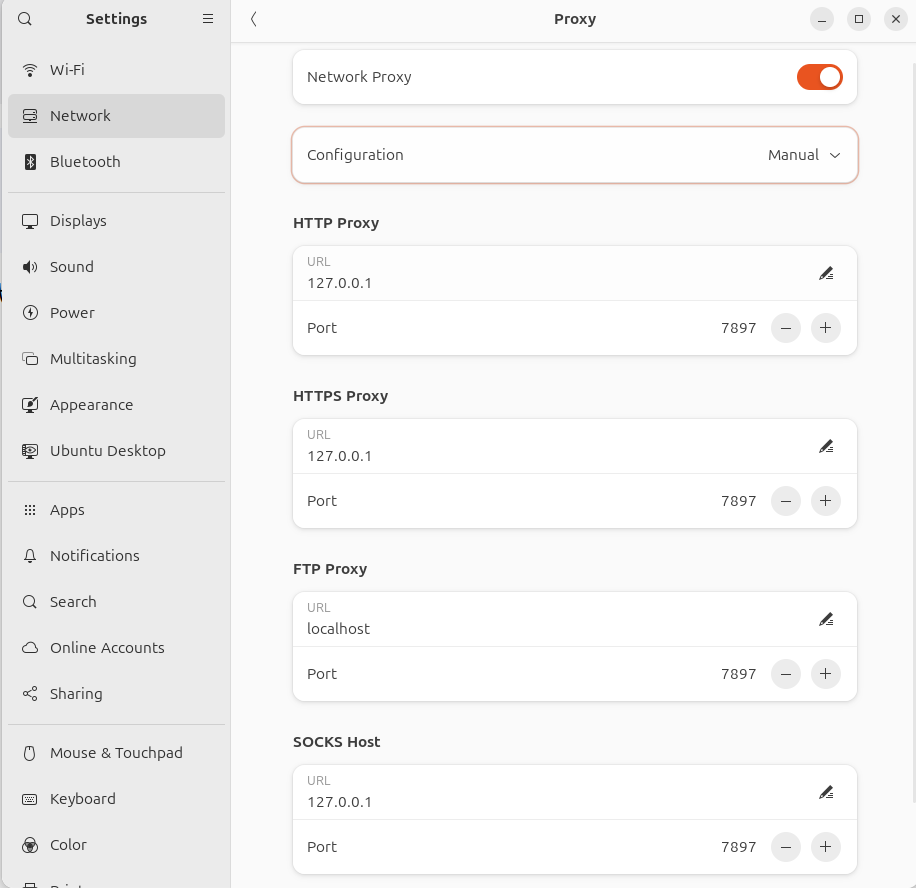
代理的设置取决于应用层的协议,比如HTTPS代理,SSH代理等。本地代理软件如v2ray等一般提供HTTP,HTTPS,SOCKS代理协议。下图是ubuntu24的系统代理设置(其中本地代理端口为127.0.0.1:7897)。

image-20250512163458271

设置命令行代理

1
sudo vim ~/.bashrc

Add proxy configuration in ~/.bashrc:

1
2
export HTTP_PROXY="<http://127.0.0.1:7897>"
export HTTPS_PROXY="<http://127.0.0.1:7897>"

GIT 设置代理

在使用GIT时,会用到HTTPS或者SSH协议来下载上传文件,在GIT中两种协议需要分别设置:

全局代理HTTPS:

  • 使用http代理:git config --global http.proxy http://127.0.0.1:58591

  • 使用socks5代理:git config --global http.proxy socks5://127.0.0.1:51837

只对Github代理HTTPS:git config --global http.https://github.com.proxy socks5://127.0.0.1:51837

全局代理SSH:

1
vim ~/.ssh/config
1
2
3
4
5
6
7
8
9
10
11
12
13
14
15
ProxyCommand nc -v -x 127.0.0.1:7897 %h %p

Host github.com
User git
Port 443
Hostname ssh.github.com
IdentityFile "/home/amber/.ssh/id_rsa"
TCPKeepAlive yes

Host ssh.github.com
User git
Port 443
Hostname ssh.github.com
IdentityFile "/home/amber/.ssh/id_rsa"
TCPKeepAlive yes

其中ProxyCommand nc -v -x 127.0.0.1:7897 %h %p中的地址为本地代理地址,IdentityFile "/home/amber/.ssh/id_rsa"时SSH密钥地址

Set npm proxy

Prerequisite: Set a proxy such as clash at localhost or remote server.

1
2
3
4
5
6
npm config set https-proxy <http://id:pass@proxy.example.com>:port
npm config set proxy <http://id:pass@proxy.example.com>:port

# for example
npm config set https-proxy <http://127.0.0.1:7897>
npm config set proxy <http://127.0.0.1:7897>

Set Electron proxy for download

1
sudo vim ~/.bashrc

Add GLOBAL_AGENT_HTTPS_PROXY to ~/.bashrc

1
2
3
# for electron
export ELECTRON_GET_USE_PROXY='true'
export GLOBAL_AGENT_HTTPS_PROXY="<http://127.0.0.1:7897>"

SpringMVC 是基于 Servlet 为核心,核心组件为DispatcherServlet。其基于Tomcat或Jetty或Undertow或WebSphere。

模型(Model):模型表示应用程序的数据、业务逻辑和规则。它是系统的核心,负责管理数据、状态以及与数据库或外部服务的交互。

视图(View):视图负责向用户呈现数据,是用户与应用程序交互的界面。

控制器(Controller):控制器是模型和视图之间的中介,负责处理用户输入并协调模型与视图的交互。

工作原理:

  1. 用户通过视图(如点击按钮、提交表单)与应用程序交互。
  2. 控制器接收用户输入,解析请求,并调用相应的模型进行数据处理。
  3. 模型执行必要的业务逻辑,更新数据状态,并通知视图需要更新。
  4. 视图根据模型的最新数据重新渲染,呈现给用户。
  5. 循环重复此过程,保持用户界面的动态更新。

SpringBoot 加载 DispatcherServlet

若按照XML的形式配置文件,需要在Tomcat中的web.xml中添加DispatcherServlet

1
2
3
4
5
6
7
8
9
10
11
12
13
14
15
16
17
18
19
20
21
22
23
24
25
26
<?xml version="1.0" encoding="UTF-8"?>
<web-app xmlns="http://xmlns.jcp.org/xml/ns/javaee"
xmlns:xsi="http://www.w3.org/2001/XMLSchema-instance"
xsi:schemaLocation="http://xmlns.jcp.org/xml/ns/javaee http://xmlns.jcp.org/xml/ns/javaee/web-app_4_0.xsd"
version="4.0">

<!-- 配置 DispatcherServlet -->
<servlet>
<servlet-name>dispatcher</servlet-name>
<servlet-class>org.springframework.web.servlet.DispatcherServlet</servlet-class>
<!-- 指定 Spring MVC 配置文件路径(可选) -->
<init-param>
<param-name>contextConfigLocation</param-name>
<param-value>/WEB-INF/spring-mvc-config.xml</param-value>
</init-param>
<!-- 启动时加载 Servlet -->
<load-on-startup>1</load-on-startup>
</servlet>

<!-- 映射 DispatcherServlet 处理的 URL 模式 -->
<servlet-mapping>
<servlet-name>dispatcher</servlet-name>
<url-pattern>/</url-pattern>
</servlet-mapping>

</web-app>

此XML配置下,所有的请求都会被传递给DispatcherServlet处理。默认 DispatcherServlet 会加载 WEB-INF/[DispatcherServlet的Servlet名字]-servlet.xml 配 置 文 件 。 本 示 例 为 /WEB-INF/spring-mvc-config.xml 其中会注册一些bean类。

若按照Java注解配置,SpringBoot会根据自动配置将DispatcherServlet传递给内置Tomcat

在springboot启动过程中,会处理自动配置注解@EnableAutoConfiguration,其中通过@Import(AutoConfigurationImportSelector.class)注解执行AutoConfigurationImportSelector.classselectImports()方法。在此方法中会将路径中所有的org.springframework.boot.autoconfigure.AutoConfiguration.imports文件中的配置类读入。其中与MVC的有关的主要类是org.springframework.boot.autoconfigure.web.servlet.WebMvcAutoConfigurationorg.springframework.boot.autoconfigure.web.servlet.DispatcherServletAutoConfigurationorg.springframework.boot.autoconfigure.web.servlet.ServletWebServerFactoryAutoConfiguration

其中

  • WebMvcAutoConfiguration中存储Spring Web MVC的一些默认配置;

  • DispatcherServletAutoConfiguration中注册两个bean类DispatcherServletDispatcherServletRegistrationBean 后者中会注入前者,并在Servlet容器(如Tomcat)启动时会将前者的Sevlet类自动加载。即在内置Servlet容器时会自动执行DispatcherServletRegistrationBean的父类方法ServletContextInitializeronStartup()方法,将DispatcherServlet注册到Servlet容器中;

    SpringBoot启动过程中,因为是 web servlet 所以执行 ServletWebServerApplicationContext.onRefresh().createWebServer() 其中会调用TomcatServletWebServerFactory.getWebServer() 其中会创建 Tomcat类并在prepareContext(tomcat.getHost(), initializers);中将SpringBoot中的ServletContextInitializer注册进Tomcat中。

  • ServletWebServerFactoryAutoConfiguration会将SpringBoot支持的Servlet容器根据条件自动导入,包括EmbeddedTomcat EmbeddedJetty EmbeddedUndertow 然后注册两个bean类ServletWebServerFactoryCustomizerServletWebServerFactoryCustomizer

DispatcherServlet 处理请求

DispatcherServlet主要组成:

  • HandlerMapping:映射请求
  • HandlerAdapter:执行控制器
  • ViewResolver:用于解析视图(如Thymeleaf 或 JSP)。
  • HttpMessageConverter:支持JSON/XML的序列化和反序列化

当DispatcherServlet注册到Tomcat中后,每当请求进入后会自动执行DispatcherServlet的Service()方法,在其父类FrameworkServlet

1
2
3
4
5
6
7
8
9
10
11
@Override
protected void service(HttpServletRequest request, HttpServletResponse response)
throws ServletException, IOException {

if (HTTP_SERVLET_METHODS.contains(request.getMethod())) {
super.service(request, response);
}
else {
processRequest(request, response);
}
}

最终都会执行processRequest(request, response)方法,其中会执行doService(request, response)方法,DispatcherServlet.doService()会执行DispatcherServlet.doDispatch(request, response)

主要步骤有:

1
2
3
4
5
6
7
8
9
10
11
12
13
14
15
16
17
18
protected void doDispatch(HttpServletRequest request, HttpServletResponse response) throws Exception {
try {
try {
// Determine handler for the current request.
mappedHandler = getHandler(processedRequest);
HandlerAdapter ha = getHandlerAdapter(mappedHandler.getHandler());
// Actually invoke the handler.
mv = ha.handle(processedRequest, response, mappedHandler.getHandler());
applyDefaultViewName(processedRequest, mv);
}
catch (Exception ex) {
}
processDispatchResult(processedRequest, response, mappedHandler, mv, dispatchException);
}
catch (Exception ex) {
}
}

  • mappedHandler = getHandler(processedRequest); 通过handlerMappings寻找符合条件的handler(即Controller)
  • getHandlerAdapter(mappedHandler.getHandler()); 找到适配handler的适配器HandlerAdapter
  • ha.handle(processedRequest, response, mappedHandler.getHandler());handler 传入适配的HandlerAdapter并执行其hanlder()方法,适配器调用处理器方法(如 @RequestMapping 方法),生成 ModelAndView
  • processDispatchResult():通过 ViewResolver 解析视图 和 统一处理异常,生成错误响应。

整体处理流程:

  1. Servlet 容器(Tomcat)的请求转发:
  • Tomcat 接收请求:客户端请求首先由 Tomcat 的 Connector 接收,解析 HTTP 协议后生成 HttpServletRequestHttpServletResponse 对象。

  • Servlet 匹配:Tomcat 根据 URL 映射规则,将请求转发到对应的 Servlet(此处为 DispatcherServlet)。

  1. DispatcherServlet 的初始化流程:
  • service() 方法:Tomcat 调用 DispatcherServletservice() 方法(继承自 HttpServlet)。

  • doService() 方法DispatcherServlet 重写了 doService(),在其中初始化一些上下文(如 LocaleContextRequestAttributes),然后调用 doDispatch()

  1. doDispatch() 的核心逻辑:

    doDispatch() 负责以下关键步骤:

    1. 处理 Multipart 请求(如文件上传)。
    2. 获取处理器链HandlerExecutionChain),包含目标处理器和拦截器。
    3. 调用拦截器的 preHandle()
    4. 执行处理器方法(如 @Controller 中的方法),生成 ModelAndView
    5. 调用拦截器的 postHandle()
    6. 处理结果(渲染视图或处理异常)。
  2. 视图渲染与响应写入

  • processDispatchResult():在 doDispatch() 的末尾,调用此方法处理视图渲染或异常。
    • 视图渲染:通过 ViewResolver 解析视图,调用 View.render() 将模型数据写入响应。
    • 异常处理:通过 HandlerExceptionResolver 生成错误响应。

请求类型

GET

1
@RequestMapping(value="/create", method = RequestMethod.GET)
1
@GetMapping("/create")

POST

1
@RequestMapping(value="/create", method = RequestMethod.POST)
1
@PostMapping("/create")

其他请求类型限制:

1
2
3
4
5
6
7
8
9
@RequestMapping(value = "/user", params = "id") // 必须有id参数
@RequestMapping(value = "/user", params = "!id") // 不能有id参数
@RequestMapping(value = "/user", params = "id=123") // id参数必须为123

@RequestMapping(value = "/user", headers = "content-type=text/*") // 匹配特定Content-Type
@RequestMapping(value = "/user", headers = "!X-Custom-Header") // 不能包含特定头

@RequestMapping(value = "/user", consumes = "application/json") // 只处理Content-Type为JSON的请求
@RequestMapping(value = "/user", produces = "application/json") // 只产生JSON响应

请求数据格式

Form格式

前端代码

1
2
3
4
5
6
7
<form action="/login" method="post">
<label for="username">账号:</label>
<input type="text" id="username" name="username" required>
<label for="password">密码:</label>
<input type="password" id="password" name="password" required>
<button type="submit">登录</button>
</form>

传输数据

1
2
3
4
POST /login HTTP/1.1
Content-Type: application/x-www-form-urlencoded

username=user123&password=pass123

后端代码

1
2
3
4
5
6
7
8
9
10
11
12
13
@PostMapping("/login_form")
public ResponseEntity<String> loginForm(@ModelAttribute LoginRequest loginRequest) {
String username = loginRequest.getUsername();
String password = loginRequest.getPassword();

// 模拟验证逻辑(实际中应调用服务层验证)
if (username != null && password != null && !username.isEmpty() && !password.isEmpty()) {
// 假设验证通过
return ResponseEntity.success("登录成功,用户: " + username);
} else {
return ResponseEntity.badRequest("账号或密码无效");
}
}

JSON格式

JavaScript代码

1
2
3
4
5
6
7
8
9
10
11
12
fetch('/login', {
method: 'POST',
headers: {
'Content-Type': 'application/json'
},
body: JSON.stringify({
username: 'user123',
password: 'pass123'
})
})
.then(response => response.text())
.then(data => console.log(data));

传输数据

1
2
3
4
POST /login HTTP/1.1
Content-Type: application/json

{"username":"user123","password":"pass123"}

后端代码

1
2
3
4
5
6
7
8
9
10
11
12
13
@PostMapping("/login")
public ResponseEntity<String> login(@RequestBody LoginRequest loginRequest) {
String username = loginRequest.getUsername();
String password = loginRequest.getPassword();

// 模拟验证逻辑(实际中应调用服务层验证)
if (username != null && password != null && !username.isEmpty() && !password.isEmpty()) {
// 假设验证通过
return ResponseEntity.success("登录成功,用户: " + username);
} else {
return ResponseEntity.badRequest("账号或密码无效");
}
}

请求路径格式

普通 URL 路径映射

@RequestMapping(value={"/test1", "/user/create"})

URI 模板模式映射

  • @RequestMapping(value="/users/{userId}")
  • @RequestMapping(value="/users/{userId}/create")
  • @RequestMapping(value="/users/{userId}/topics/{topicId}")

需要通过@PathVariable来获取URL中参数。

1
2
3
4
5
6
7
8
9
10
11
12
13
14
@RestController
@RequestMapping("/api")
public class ExampleController {

@GetMapping("/users/{id}")
public String getUserById(@PathVariable Long id) {
return "User ID: " + id;
}

@GetMapping("/users/{userId}/orders/{orderId}")
public String getOrderDetails(@PathVariable Long userId, @PathVariable Long orderId) {
return "User: " + userId + ", Order: " + orderId;
}
}

Ant 风格的 URL 路径映射

  • @RequestMapping(value="/users/**"):可以匹配/users/abc/abc,但/users/123将会被【URI模板模式映射 中的/users/{Id}模式优先映射到】
  • @RequestMapping(value="/product?"):可匹配/product1/producta,但不匹配/product/productaa
  • @RequestMapping(value="/product*"):可匹配/productabc/product,但不匹配/productabc/abc
  • @RequestMapping(value="/product/*"):可匹配/product/abc,但不匹配/productabc
  • @RequestMapping(value="/products/**/{productId}"):可匹配/products/abc/abc/123/products/123,也就是Ant风格和URI模板变量风格可混用

正则表达式风格的 URL 路径映射

@RequestMapping(value="/products/{categoryCode:\\d+}-{pageNumber:\\d+}"):可 以 匹 配 /products/123-1,但不能匹配/products/abc-1,这样可以设计更加严格的规则。

@RequestMapping("/{textualPart:[a-z-]+}-{numericPart:[\\d]+}")

SpringMVC注解

控制器相关注解

  • @Controller
    • 标记一个类为 Spring MVC 控制器,负责处理 HTTP 请求。
    • 示例:@Controller public class MyController { … }
  • @RestController
    • 组合注解,等价于 @Controller + @ResponseBody,表示控制器方法返回的对象直接序列化为 JSON 或 XML。
    • 示例:@RestController public class ApiController { … }
  • @Component
    • 通用注解,可用于控制器类,纳入 Spring 容器管理(通常搭配其他注解使用)。
  • @RequestMapping
    • 映射 HTTP 请求到控制器方法或类,支持 GET、POST 等方法。
    • 属性:value(路径)、method(请求方法)、produces(响应类型)、consumes(请求类型)。
    • 示例:@RequestMapping(value = “/home”, method = RequestMethod.GET)
  • @GetMapping@PostMapping@PutMapping@DeleteMapping@PatchMapping
    • @RequestMapping 的快捷方式,分别对应 HTTP 的 GET、POST、PUT、DELETE 和 PATCH 请求。
    • 示例:@GetMapping(“/users”)

请求参数与路径处理注解

  • @PathVariable
    • 从 URL 路径中提取变量,绑定到方法参数。
    • 示例:@GetMapping(“/user/{id}”) public String getUser(@PathVariable Long id)
  • @RequestParam
    • 从请求参数(查询字符串或表单数据)中提取值,绑定到方法参数。
    • 属性:name(参数名)、required(是否必须)、defaultValue(默认值)。
    • 示例:@RequestParam(value = “name”, defaultValue = “Guest”) String name
  • @RequestBody
    • 将 HTTP 请求的正文(如 JSON 或 XML)绑定到方法参数,通常用于 RESTful API。
    • 示例:@PostMapping(“/user”) public void saveUser(@RequestBody User user)
  • @RequestHeader
    • 从 HTTP 请求头中提取值,绑定到方法参数。
    • 示例:@RequestHeader(“User-Agent”) String userAgent
  • @CookieValue
    • 从请求的 Cookie 中提取值,绑定到方法参数。
    • 示例:@CookieValue(“sessionId”) String sessionId
  • @MatrixVariable
    • 从 URL 路径中的矩阵变量(如 /path;key=value)提取值。
    • 示例:@GetMapping(“/data/{path}”) public String getMatrix(@MatrixVariable String key)

响应处理注解

  • @ResponseBody
    • 表示方法返回值直接作为 HTTP 响应正文,通常序列化为 JSON 或 XML。
    • 示例:@ResponseBody public User getUser()
  • @ResponseStatus
    • 指定控制器方法或异常处理方法的 HTTP 状态码。
    • 示例:@ResponseStatus(HttpStatus.CREATED)
  • @ModelAttribute
    • 将方法返回值或参数绑定到模型对象,供视图使用;也可用于方法级,预填充模型数据。
    • 示例:@ModelAttribute(“user”) public User getUser()

异常处理注解

  • @ExceptionHandler
    • 标记方法用于处理特定异常,限定在控制器内部。
    • 示例:@ExceptionHandler(NullPointerException.class) public ResponseEntity handleException()
  • @ControllerAdvice
    • 定义全局异常处理、模型增强或绑定器,作用于所有控制器。
    • 示例:@ControllerAdvice public class GlobalExceptionHandler { … }

跨域与配置相关注解

  • @CrossOrigin
    • 启用跨域资源共享(CORS),可用于类或方法级别。
    • 属性:origins(允许的域名)、methods(允许的请求方法)。
    • 示例:@CrossOrigin(origins = “http://example.com“)
  • @SessionAttributes
    • 指定模型属性存储在会话(Session)中,作用于类级别。
    • 示例:@SessionAttributes(“user”)
  • @InitBinder
    • 标记方法用于自定义数据绑定或验证逻辑,作用于控制器内部。
    • 示例:@InitBinder public void initBinder(WebDataBinder binder)

其他高级注解

  • @SessionAttribute
    • 从会话中获取属性值,绑定到方法参数。
    • 示例:@SessionAttribute(“user”) User user
  • @RequestAttribute
    • 从请求属性中获取值,绑定到方法参数。
    • 示例:@RequestAttribute(“data”) String data
  • @EnableWebMvc
    • 启用 Spring MVC 配置,通常用于自定义 MVC 配置类。
    • 示例:@EnableWebMvc @Configuration public class WebConfig { … }

建议

对于前后端分离的项目可以选择RESTful风格的API,使用JSON作为传递类型。通过@RequestBody(将HTTP的body使用JSON反序列化为Java对象) 和 @ResponseBody (将返回数据使用JSON序列化并赋值到HTTP的body中)加载请求和响应。

对于文件等二进制传输,使用Multipart/form-data格式传输:

前端上传代码:

1
2
3
4
5
6
7
8
9
10
const formData = new FormData();
formData.append('username', 'john');
formData.append('avatar', fileInput.files[0]); // 文件

// 使用 Fetch API 发送
fetch('/api/upload', {
method: 'POST',
body: formData
// 不需要设置 Content-Type,浏览器会自动设置
});

MySQL

1
docker run --name local-mysql -p 3306:3306 -e MYSQL_ROOT_PASSWORD=yingzheng -d mysql:9.5.0

Redis

1
docker run --name local-redis -p 6379:6379 -d redis:8.4.0 --requirepass "yingzheng"

MongoDB

1
2
3
4
5
6
docker run \
--name local-mongodb \
-p 27017:27017 \
-e MONGO_INITDB_ROOT_USERNAME=admin \
-e MONGO_INITDB_ROOT_PASSWORD=yingzheng \
-d mongo:8.2.2-noble

RabbitMQ

1
2
3
4
5
6
7
docker run \
--name rabbitmq \
-p 5672:5672 \
-p 15672:15672 \
-e RABBITMQ_DEFAULT_USER=admin \
-e RABBITMQ_DEFAULT_PASS=yingzheng \
-d rabbitmq:4.2.1-management

ElasticSearch

1
2
3
4
5
6
7
docker run \
--name elasticsearch \
-p 9200:9200 \
-p 9300:9300 \
-e "discovery.type=single-node" \
-e "xpack.security.enabled=false" \
-d elasticsearch:9.2.1
1
2
3
4
5
6
7
8
9
10
11
12
13
14
15
16
17
18
19
20
21
22
23
24
25
26
27
28
29
30
31
32
33
34
35
36
37
38
39
40
41
version: "3.8"

services:
elasticsearch:
image: docker.elastic.co/elasticsearch/elasticsearch:8.14.1
container_name: elasticsearch
environment:
- discovery.type=single-node
- xpack.security.enabled=false # 关闭安全(简化开发)
- ES_JAVA_OPTS=-Xms1g -Xmx1g
ulimits:
memlock:
soft: -1
hard: -1
volumes:
- es-data:/usr/share/elasticsearch/data
ports:
- "9200:9200"
- "9300:9300"
networks:
- elk

kibana:
image: docker.elastic.co/kibana/kibana:8.14.1
container_name: kibana
environment:
- ELASTICSEARCH_HOSTS=http://elasticsearch:9200
# 如果你后来启用 xpack.security,需要在 Kibana 配置用户名密码
ports:
- "5601:5601"
depends_on:
- elasticsearch
networks:
- elk

volumes:
es-data:

networks:
elk:

0%